Skip to content
All features

QR codes

QR codes that tell you what worked.

Every SwiftURL link comes with a QR code for posters, packaging, menus and events. Download it as PNG or SVG at print size, and see its scans counted separately from clicks, so you know exactly what your offline placements drive. On Pro and above, put your colors and logo on it.

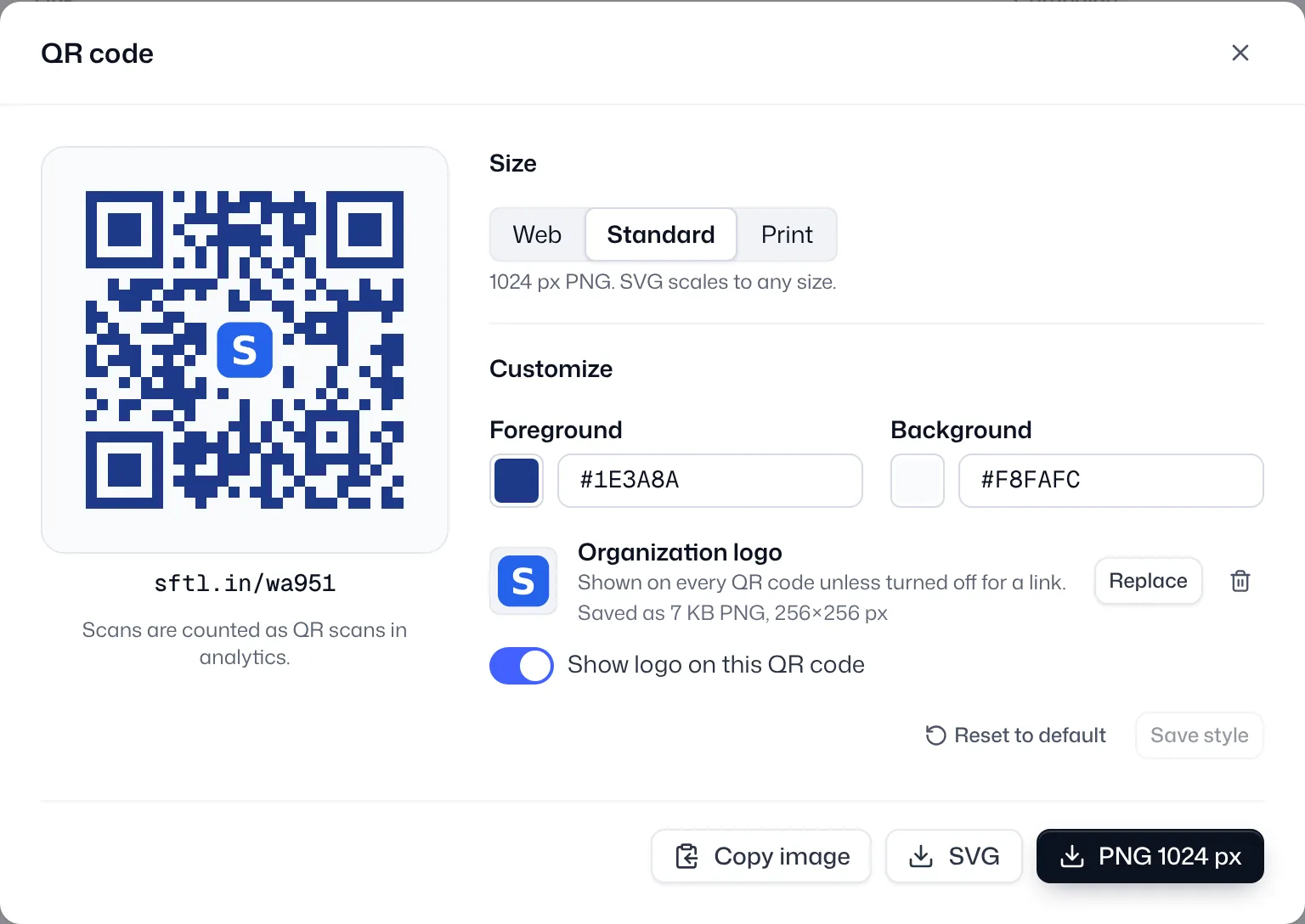
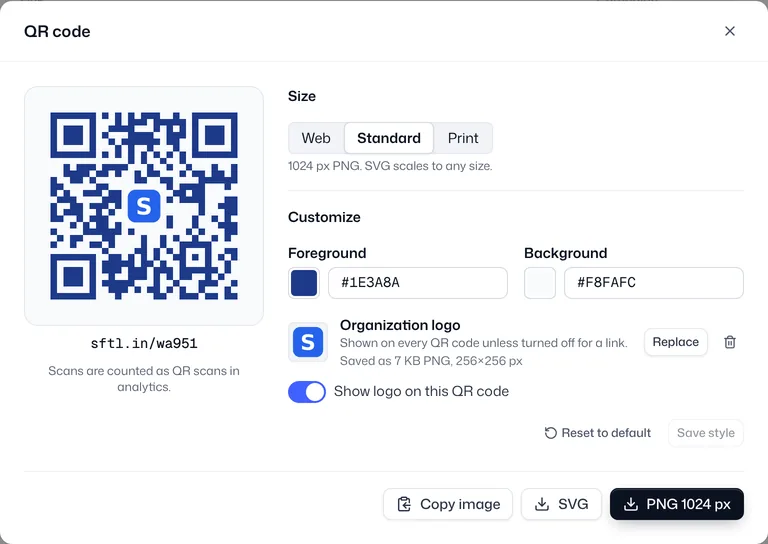
The SwiftURL QR code dialog for sftl.in/wa951: a navy branded code with the organization logo, Web, Standard and Print sizes, foreground and background colors, the logo saved as a 7 KB PNG, and PNG, SVG and copy image buttons

What do you get with SwiftURL QR codes?

A QR code is built into every link, not bolted on. It points at your short link on your own domain, so the code stays the same while the destination can change, and every scan lands in the same analytics as your clicks.

A QR code on every link, print sizes included

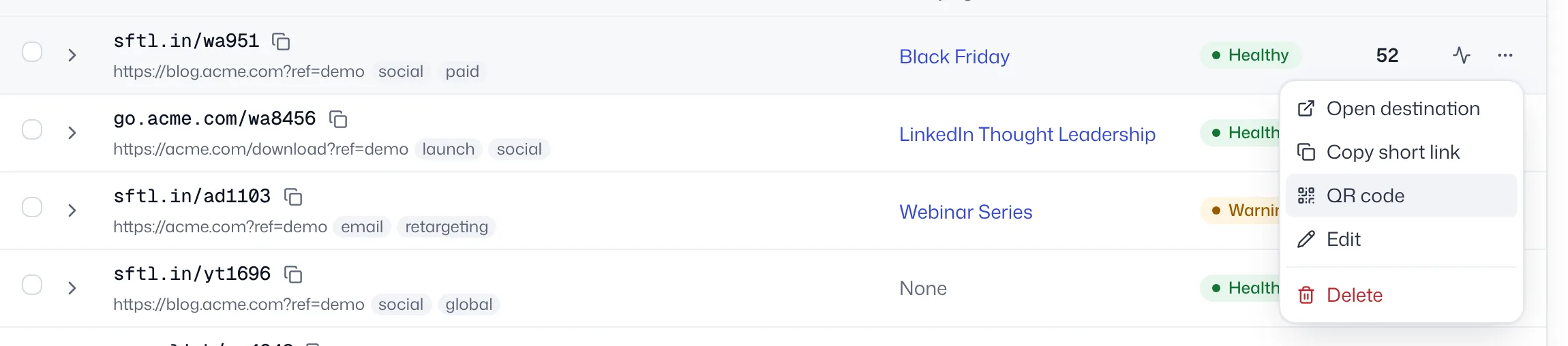
Open any link’s menu and choose QR code. Pick Web (512 px), Standard (1024 px) or Print (2048 px) for a PNG, take the SVG for signage and packaging that needs any size, or copy the image straight into a design tool. Free plans get the standard black on white code with every one of these options.
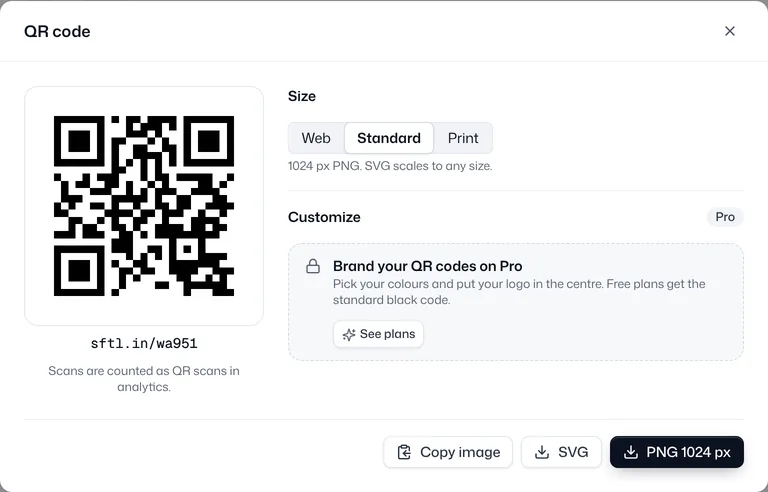
The QR code dialog on the Free plan: a black on white code for sftl.in/wa951, size presets, the branded QR upsell for Pro, and Copy image, SVG and PNG 1024 px buttons

Scans counted separately from clicks

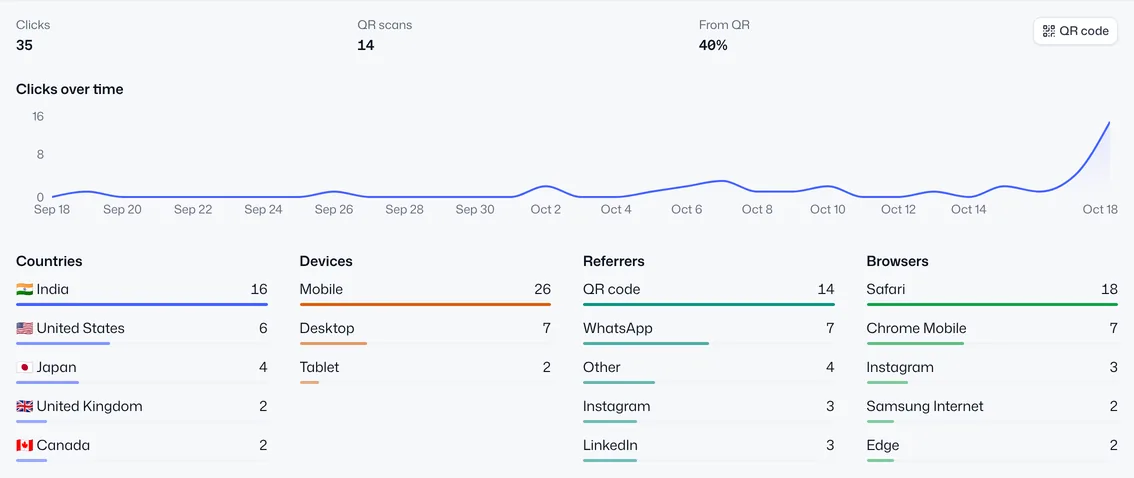
Every code carries a small scan marker, so a scan is recorded as a QR scan instead of a click, and the marker is removed before the redirect. Each link’s analytics show clicks, QR scans and the share from QR, and QR code appears as a source next to WhatsApp, Instagram and the rest.

A link’s analytics: 35 clicks, 14 QR scans and 40% from QR, clicks over time, and QR code as the top referrer with 14 visits

Your colors and your logo, on Pro and above

Set a foreground and background color per link, and upload your organization’s logo once (PNG, JPG or SVG) to show it in the center of every code, or switch it off for one link. A contrast check warns you, or blocks the save, when the colors would be hard for phones to read.

QR customization: foreground #1E3A8A and background #F8FAFC, the organization logo, and the switch to show the logo on this QR code

One link or a hundred

Get a single code from the link’s menu, or select up to 100 links and download every code as one ZIP of PNGs, drawn with each link’s saved style. Codes work for password-protected links and deep links too.

A link’s menu in the links list, with Open destination, Copy short link, QR code, Edit and Delete

A QR endpoint in the API

Fetch any link’s code from your own systems: choose PNG or SVG, a size from 128 to 2048 px, and an optional download file name. The X-QR-Content header returns the exact URL the code encodes. Needs an API key with read access, included from Pro.

GET /api/v1/links/{id}/qr200 OK
GET /api/v1/links/clx1234abcdef/qr?format=svg
Authorization: Bearer ql_live_...
200 OK
Content-Type: image/svg+xml
X-QR-Content: https://go.acme.com/summer24?qr
  • A QR code for every link, on every plan
  • PNG at 512, 1024 or 2048 px, or SVG at any size
  • Scans counted as QR scans, separately from clicks
  • Your colors and logo on Pro and above, with a contrast check
  • Bulk ZIP download for up to 100 links at a time
  • A QR endpoint in the REST API, PNG or SVG

How do you make a trackable QR code?

  1. Create a link

    Any link, on your own domain or sftl.in, already has a QR code.

  2. Style it (Pro)

    Pick colors, add your logo and check the contrast.

  3. Download and print

    PNG at print size or SVG, one at a time or 100 in a ZIP.

  4. Read the scans

    See QR scans next to clicks in the link’s analytics.

Why use SwiftURL for QR codes?

  • Offline, measured

    Posters, flyers and packaging finally get their own numbers, separate from online clicks.

  • Print once

    Change the destination later without reprinting a single code.

  • Safe to scan

    Every destination behind a code passes the same Google Web Risk and safety checks as any link.

Frequently asked questions

Is there a QR code for every link?

Yes. Every SwiftURL link has a QR code on every plan, Free included, with no watermark and no monthly QR limit. Open it from the link’s menu and download it as a PNG (512, 1024 or 2048 px) or an SVG that scales to any size, or copy the image straight to your clipboard.

How are QR scans tracked?

The code encodes the link’s short URL with a small ?qr marker. When someone scans it, SwiftURL records the visit as a QR scan instead of a regular click, and removes the marker before redirecting, so your destination URL and its UTM tags arrive unchanged. In a link’s analytics you see clicks, QR scans and the share that came from QR, and “QR code” appears as a source.

Can I add my logo and brand colors?

Yes, on Pro and above. Pick a foreground and background color for each link and upload your organization’s logo (PNG, JPG or SVG) to put in the center of every code, or turn it off for a single link. Free plans get the standard black on white code with every download option. See pricing.

Will a branded QR code still scan?

SwiftURL checks the contrast between your two colors as you pick them. Below 3:1 the style can’t be saved, because most phones can’t read it; light-on-dark codes and contrast under 4.5:1 get a warning. Codes with a logo use the highest error correction level, and the logo covers about a quarter of the code’s width, well inside what scanners can recover.

Can I change where a QR code points after I print it?

Yes. The code holds your short link, not the destination, so you can edit the link’s destination at any time and every printed code follows. Deleting or expiring the link stops the code too.

Do QR codes work with password-protected links and deep links?

Yes. A scan of a password-protected link opens the password screen on your own short domain first, and is still counted as a QR scan. With deep linking, scanning on a phone opens your app on the right screen, with the usual fallback to the store or the web.

Can I download QR codes in bulk or from the API?

Yes. Select up to 100 links in the links list and download all their QR codes as one ZIP of PNGs. Developers can fetch any link’s code with GET /api/v1/links/{id}/qr, as PNG or SVG at 128 to 2048 px. See the API reference.

Put a trackable QR code on your next print run.

Start free: every link gets a QR code, and Pro adds your colors and logo.