Compliance
TRAI CTA whitelisting for short links
TRAI CTA whitelisting blocks SMS with URLs not registered on DLT. Here is why short links get blocked, and how to whitelist one short domain once.
On this page
TRAI CTA whitelisting is the rule that a commercial SMS in India may only contain URLs, APKs, OTT links and call-back numbers that the sender has registered on the DLT platform. Since 1 October 2024, operators block messages whose links are not on the sender’s whitelist, which is why short links on unregistered or shared shortener domains stop being delivered. The simplest fix is to send every link from one branded short domain you own and whitelist that domain on your DLT portal once.
This guide explains what the rule says, why redirecting short links get caught by it, how whitelisting works on a DLT portal, and how a branded short domain turns it into a one-time task. It builds on our earlier explainer, how DLT and TRAI rules affect your marketing links, which covers headers and templates.
What is TRAI CTA whitelisting?
On 20 August 2024, the Telecom Regulatory Authority of India (TRAI) issued a Direction instructing all access providers to block any traffic containing URLs, APKs or OTT links that have not been whitelisted. TRAI’s press release no. 67 of 2024 asked registered senders to upload their links to the portal of their access provider, and warned that senders who fail to whitelist “will not be able to transmit any messages containing URL/APK/OTT links.” The original deadline of 1 September 2024 was moved by a month to 1 October 2024.
“CTA” stands for call to action: the part of a message a person acts on. SMS gateways describe the scope as URLs, APKs, OTT links, WhatsApp Business links and call-back numbers, all whitelisted by the Principal Entity (PE) that sends the message (MSG91, Fast2SMS). If a message carries a URL that is not in the sender’s whitelisted list, it fails scrubbing and is not delivered.
Why do redirecting short links get blocked?
Scrubbing happens on the message text, so the URL that is matched against your whitelist is the one that appears in the SMS. For a short link, that is the short domain, not the page it redirects to. Three things follow:
- A short link on a domain you never whitelisted fails, even if the destination behind it is your own, whitelisted website.
- Shared public shortener domains are a poor bet. Gateways tell their customers that generic shortened URLs such as bit.ly or tinyurl will not be approved, because links on a shared domain cannot be traced back to one sender (Zoho).
- Every new shortener domain is a new entry. If different teams or tools shorten links on different domains, each one has to be whitelisted, and the one somebody forgot is the one that breaks a campaign.
How do you whitelist a domain on the DLT portal?
Each operator runs its own DLT portal (Jio, Airtel, Vi, BSNL, Tata and Videocon among them), and menus, field names and formats differ. Some gateways report that a CTA whitelisted on one portal is shared with the others, so check your provider’s guidance before you register the same entry everywhere. The generic flow looks like this:
- Log in to your operator’s DLT portal as an enterprise (PE). Use the account that owns your sender headers and templates.
- Open the CTA whitelisting section and choose to add a new CTA. On Vi’s portal, for example, this is CTA Whitelisting, then Single CTA, then ”+ Whitelist CTA” (SMS Alert’s Vi guide).
- Pick the CTA type. Portals separate static URLs, dynamic URLs, short URLs, APK links, WhatsApp links and numbers. Gateway guides note that URLs start with http, https or www, and that a dynamic URL is entered ending in a question mark (Fast2SMS).
- Enter your short domain and link it to a header where the portal asks. Vi’s short-URL type, for example, asks you to select an active header, enter the short domain, and give a sample short link.
- Add a remark and submit, then wait for the operator’s approval.
- Register or update your content templates so the link sits in a variable, and keep the wording close to what you registered. Gateways advise that existing templates containing a URL may need to be updated and re-approved.
Keep a list of what you whitelisted, under which header, and when. When delivery drops, that list is the first thing to check.
How does a branded short domain make this a one-time task?
When every campaign link is on one short domain you own, the domain is the only URL your whitelist needs to cover. You register it once (once per header, on portals that ask for a header), and from then on every new link you create on that domain carries a URL that is already whitelisted. There is no per-campaign whitelisting, no waiting on approval before a launch, and no risk that a teammate pastes a link from an unregistered shortener.
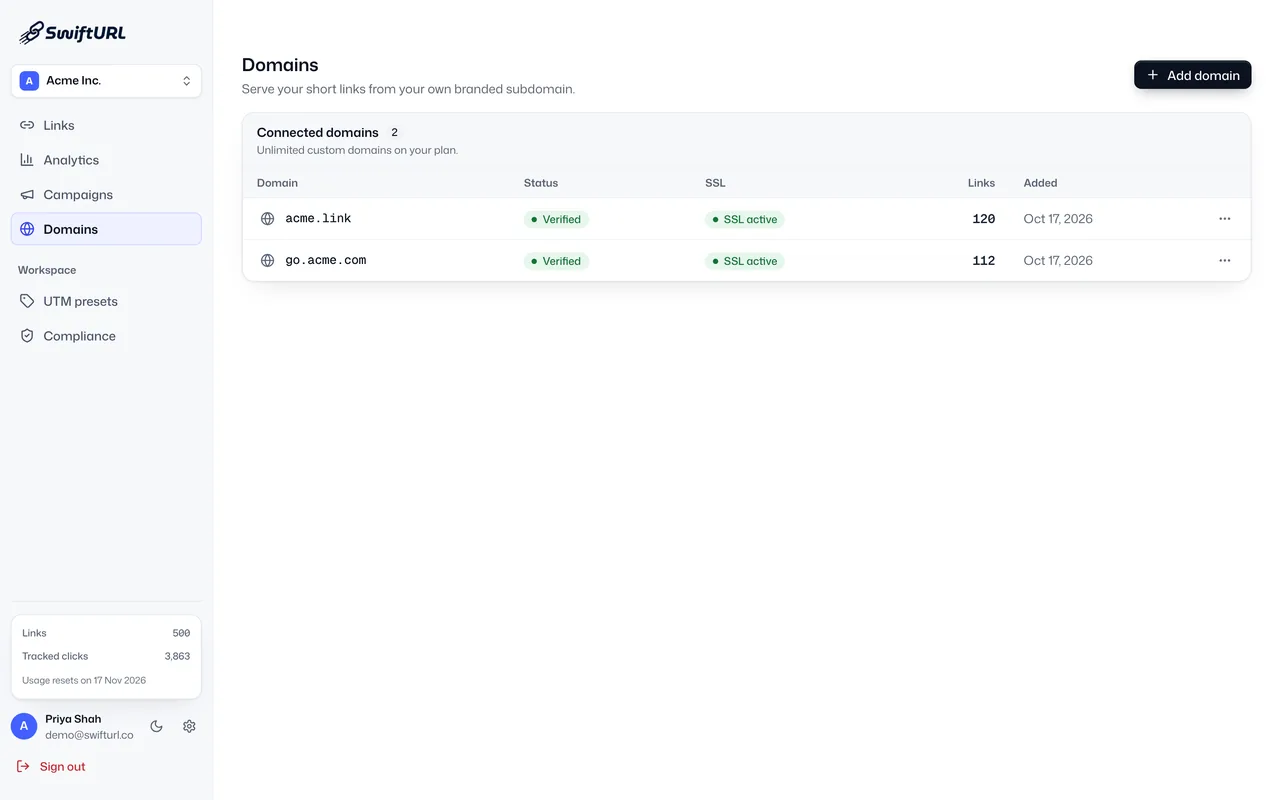
In SwiftURL that looks like this:
- Connect a branded short domain, such as
go.yourbrand.in, under custom domains. It is one CNAME record, and SSL is provisioned for you; our guide on how to set up a branded short domain walks through it. Pro includes 3 custom domains and Business 25. - Whitelist that domain on your DLT portal in the format your operator asks for.
- Create every campaign link on it. Links can carry your DLT sender header (Pro and above), every destination is safety-checked before the link goes live, and clicks are tracked per campaign, as described on SMS and WhatsApp link tracking.
On the Free plan, links use the shared sftl.in domain. Whether an operator accepts a shared domain under your header is the operator’s decision, so a branded domain you own is the dependable route for SMS.
What SwiftURL does not do
SwiftURL does not submit CTAs to a DLT portal for you, and it cannot guarantee that an operator approves an entry. Whitelisting, header registration and template approval stay with you as the Principal Entity. SwiftURL makes the link side consistent: one domain, a recorded header on each link, a safety check on each destination, and a tamper-evident audit log of every change. More on how the pieces fit for Indian campaigns is on our India page.
Frequently asked questions
What does TRAI’s CTA whitelisting rule require?
Under TRAI’s Direction of 20 August 2024, access providers must block commercial SMS containing URLs, APKs or OTT links that the sender has not whitelisted on the DLT platform. It has applied since 1 October 2024. Gateways also include call-back numbers in the CTAs to whitelist.
Why was my SMS with a short link blocked?
The most common reason is that the short link’s domain is not on your whitelist. Scrubbing checks the URL that appears in the message, which for a short link is the short domain, not the page it redirects to.
Can I use bit.ly or another public shortener in Indian SMS?
Gateways advise that generic public shortener links are not approved for whitelisting, because a shared domain cannot be traced to one sender. A short domain you own, or your gateway’s own approved short-link service, is the safer choice.
Do I need to whitelist every short link separately?
Not if your portal whitelists by domain or short-URL pattern. With one branded short domain, you register that domain once, per header where the portal asks, and new links on it are covered. Follow your operator’s exact format.
Does SwiftURL whitelist my domain on DLT for me?
No. You submit CTA entries yourself on your operator’s DLT portal, and approval is the operator’s decision. SwiftURL gives you the branded domain, DLT sender headers on links (Pro and above), safety checks and an audit log.
The takeaway
TRAI’s CTA rule turns every domain in your SMS into something you must register. Keep that list to one entry: send every link from one branded short domain, whitelist it once, and let new links reuse it. See how this fits your campaigns on SMS and WhatsApp link tracking, or start free and add your domain on Pro.
This article is general information, not legal advice. TRAI directions and operator portals change; confirm current requirements with your operator or SMS gateway.